


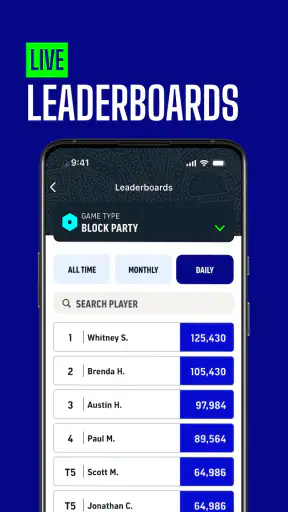
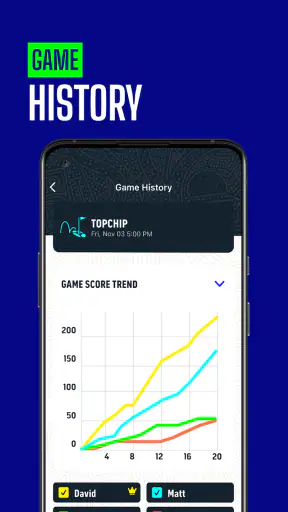
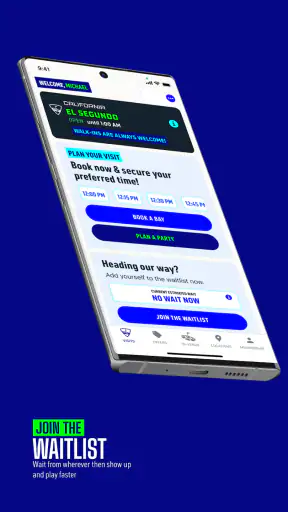
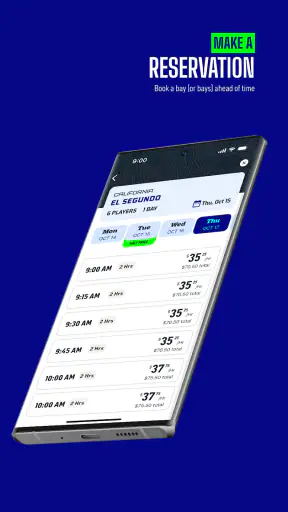
I approached Topgolf as a practical sports companion rather than just another app connected to a leisure venue. Its central value is simple: it helps turn the idea of going to Topgolf into a more organized plan, from deciding when to visit to keeping the outing easier to manage. That sounds modest, but it matters when a group is trying to coordinate a casual activity around work, family, traffic, or changing weather.
Topgolf is a free sports app from Topgolf, available for Everyone and supported on Android versions starting with 8.0. It has built a sizeable audience, with over a million installs, an average rating of 4.5, and around 8,400 ratings. Those figures suggest that it is not limited to committed golfers; it also appeals to people who treat Topgolf as a social experience.
Planning the outing instead of leaving it to chance
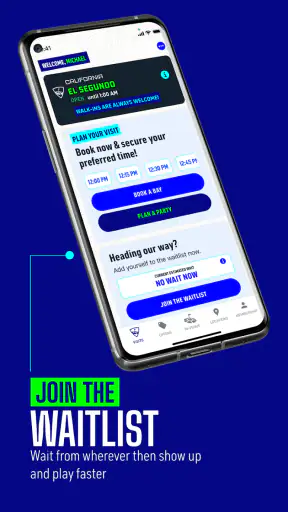
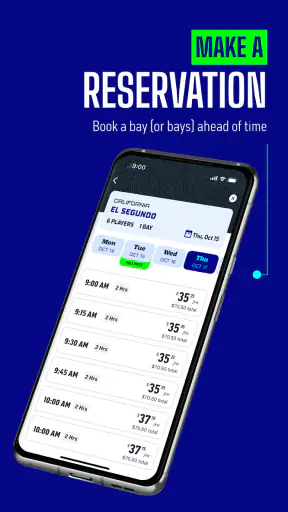
The capability I found most useful is the app’s role as a planning layer for a Topgolf visit. It is not trying to replace a full golf simulator, a swing-analysis tool, or a general sports tracker. Its job is more focused: make the venue experience easier to arrange and easier to approach before you arrive.
That distinction is important. A traditional golf app usually revolves around courses, scorecards, handicaps, GPS distances, or practice routines. Topgolf is built around a different kind of visit. You may be playing with friends who rarely golf, bringing children, arranging a casual date, or joining colleagues after work. In those situations, the hardest part is often not choosing a club. It is getting everyone aligned on the plan.
I like that the app’s usefulness does not depend on already being a skilled golfer. Someone who knows every club in the bag and someone who has never held one can approach the same outing through the app. That makes it more suitable for Topgolf’s social side than a specialist golf utility would be.
The “Let’s Play!” positioning is therefore best understood as an invitation to move from browsing to arranging a real visit. The app feels most worthwhile when I use it before the outing, while deciding what works for the group, rather than expecting it to provide a deep training program once I am already hitting balls.
How the planning experience helps in real life
Imagine a Friday afternoon when three friends want to do something active, but nobody wants to commit to a full round of golf. One person is coming directly from work, another has a child with them, and the third has not played in years. Opening a conventional golf app would probably create more questions than answers. Topgolf is a more natural fit because the intended activity is casual, social, and easier to join at different skill levels.
In that situation, I would use the app to narrow down the visit before sending a message to the group. The useful habit is to settle the practical details while everyone is still available: where to go, when to aim for, and whether the proposed session fits the group’s appetite for a short activity or a longer evening. That preparation reduces the familiar problem of arriving with enthusiasm but no shared plan.
A second realistic example is a family outing. Parents often need to think about timing, attention spans, and whether an activity will work for mixed ages. The app cannot make those decisions for you, but it gives the outing a clear starting point. I would check the plan before leaving home, confirm the venue details, and share the resulting schedule rather than asking the family to decide everything in the car.
For a workplace gathering, the benefit is even clearer. Organizers usually need something that feels active without demanding that every attendee be athletic or experienced. Topgolf’s app supports that decision-making process better than a regular golf scorecard app because the event is about participation and conversation as much as performance.
What I would do before opening the app
My best tip is to decide the purpose of the visit first. If the group wants serious golf practice, I would not begin with Topgolf. I would choose a dedicated practice or coaching tool. If the goal is a relaxed social session, I would use Topgolf early in the planning process and avoid treating it like a technical golf dashboard.
I would also prepare the information the app cannot infer from my group: who is attending, how much time we have, and whether the least experienced player needs extra encouragement. This sounds obvious, but it prevents a common mistake—choosing an activity because the strongest golfer is excited, then discovering that everyone else feels like an outsider.
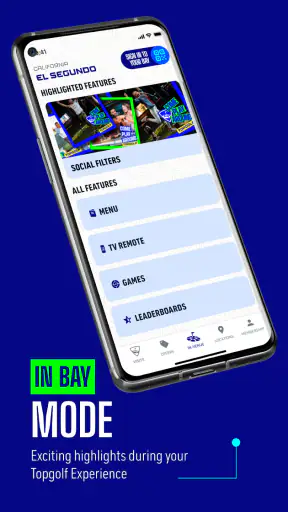
Another useful workflow is to separate planning from performance. I would handle the visit details before leaving, then keep the actual session focused on conversation and play. Constantly checking a phone during a social activity defeats the point. The app is most effective when it reduces phone time at the venue, not when it becomes another screen to monitor.
Where it is stronger than ordinary alternatives
Compared with searching the web, the app gives the outing a more direct starting point. A general search can show scattered information, but it does not feel designed around the decision to play at Topgolf. Compared with messaging friends first, it gives the organizer something concrete to discuss instead of beginning with an open-ended “What should we do?”
Compared with a standard golf app, the difference is even more pronounced. Golf utilities tend to assume that the user is interested in improving personal performance or managing a conventional round. Topgolf is better suited to a group where skill levels vary and the activity is meant to be approachable. I would choose the Topgolf app for arranging the venue experience and a specialist golf app for practice, course strategy, or detailed personal records.
That does not make it a universal replacement. If I am planning a weekend round at a traditional course, I would not install this app expecting course-management features. If I want swing feedback, club recommendations, or a structured training plan, I would look elsewhere. Its advantage comes from being specific, not from trying to cover every part of golf.
Tradeoffs, limits, and the people who benefit most
The focused purpose is also the main limitation. Someone who visits Topgolf only once may find that the app is useful during planning but not essential every day. It is not the kind of sports app I would expect to open for a general workout, a daily golf lesson, or a broad community feed. Its value rises when I have a concrete Topgolf visit in mind and falls when I am simply looking for golf content.
There is also a social tradeoff. The app can help one person organize an outing, but it cannot guarantee that the group will agree. A proposed time may not suit everyone, and a carefully planned visit can still be affected by late changes. I would treat the app as a coordination aid, not as a substitute for a quick message to the people actually attending.
New golfers should also keep their expectations realistic. The app may make the experience easier to approach, but it does not remove the small learning curve of swinging a club in front of friends. My advice is to frame the first visit as a shared activity rather than a test. That attitude is more important than finding the perfect technical setting.
For experienced golfers, the limitation is different. The app may feel too lightweight if the main reason for visiting is measurable improvement. A serious player may want detailed statistics, repeatable practice drills, or a record of progress. I would use Topgolf to organize the session, then rely on personal notes or a dedicated training solution for deeper analysis.
Device compatibility is reasonably broad because the app supports Android 8.0 and later. The current version is 4.12.0, which indicates that the app is maintained as an ongoing product rather than a one-off venue brochure. Still, I would keep the app updated before an important group booking or event. That is a sensible habit for any venue-related app, especially when the visit depends on current planning information.
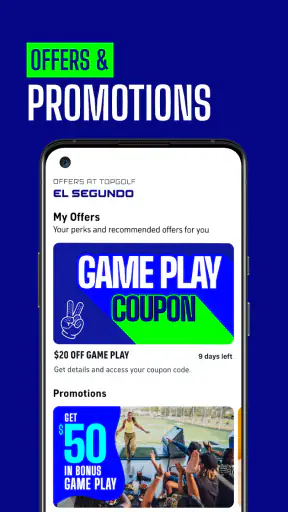
Topgolf is free, which lowers the barrier to trying it. That does not mean the entire outing is free; the app and the venue experience are separate decisions. I would install it without hesitation if I were considering a visit, but I would still plan the overall outing around the group’s available budget and time rather than confusing a free app with a free activity.
The age rating of Everyone also fits its broad audience. Families, casual players, and mixed-age groups can consider it without the app feeling aimed only at adult golfers. Even so, parents should make the practical decisions about whether the planned outing suits their children, since an age label does not replace judgment about attention spans, schedules, or comfort.
A small planning method that makes it more useful
My preferred method is a three-step routine. First, I decide whether the outing is social, family-focused, or practice-oriented. Second, I use the app to shape the practical plan around that purpose. Third, I send the group one clear message with the proposed arrangement instead of forwarding a collection of screenshots and possibilities.
This approach exposes a useful tradeoff: the app works best when one person takes ownership of the plan. If everyone browses independently, the group can end up with several competing ideas. If one organizer uses it to create a simple proposal, the app becomes a time-saver. That is a less obvious strength because it comes from the workflow around the app, not merely from opening it.
I would also suggest checking the plan earlier than feels necessary for a popular social occasion. A birthday, team event, or family weekend has more moving parts than an improvised visit. Giving the group time to respond makes the app more valuable because it supports coordination rather than last-minute scrambling.
Who should install it
I would recommend Topgolf to anyone who is actively considering a Topgolf visit, especially a person organizing for others. It is a good match for beginners, mixed-skill groups, families, workplace gatherings, and friends who want a sports activity without the formality of a conventional round. The app’s broad audience is reflected in its strong reception: it carries a 4.5 average from around 8,400 ratings and has more than a million installs.
I would be more selective if I were a dedicated golfer looking for technical improvement. In that case, I would see this as a companion for arranging a social practice session, not as my main golf tool. Likewise, someone who has no interest in visiting a Topgolf venue has little reason to keep it installed. Its usefulness is intentionally tied to that specific experience.
One feature of the app’s appeal is that it helps lower the emotional barrier for first-time visitors. People sometimes avoid golf because they assume they need knowledge, equipment, or a polished swing before they can participate. A venue-focused app cannot teach confidence by itself, but it can make the first step feel more concrete. That matters when the organizer wants everyone to feel included rather than judged.
Topgolf was released on August 31, 2013, and its continued presence alongside the current version shows how the product has remained relevant over time. I would not choose an app purely because it has existed for years, but longevity combined with a large installed base gives me more confidence that it belongs in the normal planning process for regular visitors.
My recommendation after using it as a planning tool
My honest view is that Topgolf succeeds when I ask it to do the right job. It is not a replacement for a golf coach, a course-navigation tool, or a detailed performance tracker. It is a focused sports app that helps make a Topgolf outing easier to imagine, arrange, and share with other people.
The most valuable result is not a new golf skill. It is reduced friction before the activity begins. A clear plan can turn a vague suggestion into an outing that friends, relatives, or colleagues are actually willing to attend. For a casual venue experience, that is a meaningful benefit.
I would install it before organizing a visit, use it to prepare one practical proposal, and then put the phone away once the group is playing. If that matches what you need, the free download and approachable design make it an easy recommendation. If you want serious training data or a complete golfing toolkit, choose a specialist alternative instead. Topgolf is at its best when it helps people get together and play, not when it is forced to be something more technical than that.


